Managing Patient Care Teams
Last updated: October 1, 2025
Introduction
The Care Team feature allows you to easily assign both internal staff members and external providers to patients, enabling you to build comprehensive teams with multidisciplinary skills. Care teams ensure coordinated patient care by clearly defining who is responsible for different aspects of treatment and communication. Every patient can have designated team members with specific roles from within your organization and external providers who are outside your organization, with one internal member designated as the Care Team Lead to streamline workflows and communication.
User's Guide
Understanding Care Team Types
Canvas supports two types of care team members:
Internal Care Team Members: Staff members from your organization who have direct access to the Canvas system
External Care Team Members: Providers outside your organization who are involved in patient care but don't have direct access to your Canvas system
Adding Internal Care Team Members
Internal care team members are staff from your organization who have Canvas system access.
To add internal team members:
Navigate to the patient's Profile View
Find the Care Team section on the left-hand side
Select Add under the Care Team section
Choose Internal from the member type options
Select a Team Member from the dropdown menu
The dropdown displays up to 30 staff members
Use search to locate staff members beyond the first 30
Select a Role from the dropdown menu
Select Add
Important Constraints:
Only one person can be designated as the Care Team Lead per patient
Care team members and roles cannot be used more than once per patient
Adding External Care Team Members
External care team members are providers outside your organization who participate in patient care but don't have direct Canvas access.
To add external team members:
Navigate to the patient's Profile View
Find the Care Team section on the left-hand side
Select Add under the Care Team section
Choose External from the member type options
Search the provider directory for the external provider
Select the desired provider from search results
The system will automatically populate:
Provider name
Contact information (phone and fax)
Specialty (mapped from the directory)
Select Add
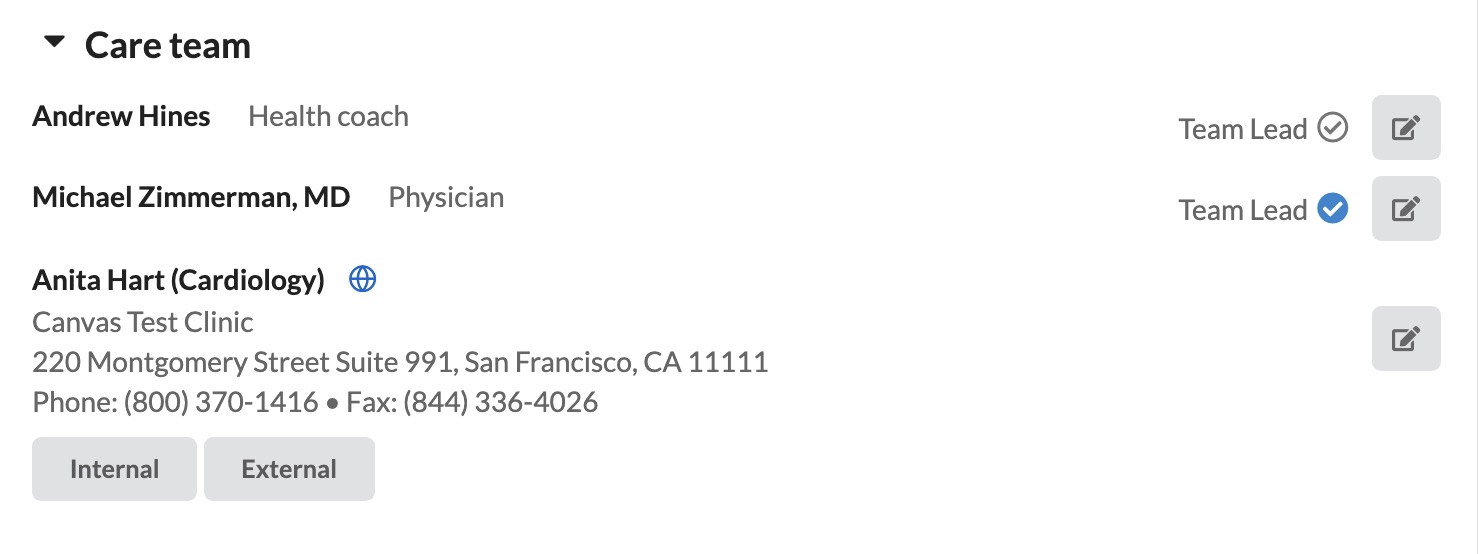
Care Team Display and Organization
Care teams are organized to provide clear visibility of all team members:
Internal team members appear first in the list
External team members appear after internal members
Within each group, members are sorted alphabetically
External members display name, specialty, phone, and fax information
Internal members show standard role and contact information

Editing Team Members
Both internal and external care team members can be edited as needed.
To edit team members:
Select Edit to the far right of the care team member's name (next to the team lead indicator)
Make desired changes:
For internal members: Update Team Member or Role
For external members: Select a different directory listing
Select Update
Removing Team Members
To remove team members:
Select Edit to the far right of the care team member's name
Select Delete
Confirm the removal
Team Member Status and Visibility
Active vs Inactive Members:
Active team members appear in the standard care team list
Inactive team members are marked with an Inactive label for visibility
When staff members are marked as inactive in their settings, an inactive label appears next to their name in all patient care teams
Care Team Lead Designation
The Care Team Lead serves as the primary point of contact and coordination for a patient's care. Only internal staff members can be designated as Care Team Lead.
Care Team Lead Responsibilities:
Incoming patient messages are automatically routed to the care team lead
When no care team lead is assigned AND no prior messages exist, incoming patient messages are assigned to Canvas Bot
When no care team lead is assigned BUT staff have previously messaged the patient, incoming messages go to the last staff member who communicated with the patient
Intervention messages and patient data exports include the care team lead's name
Defaults as the reviewer for workflows
Information appears on lab orders, chart PDFs, and specimen labels
Ordering provider and reviewer fall back to care team lead when original provider lacks valid NPI
Configuration & Set Up
Internal Care Team Setup
Care Team Roles Configuration:
Care team roles must be configured before team members can be assigned. Only staff members with roles under the Clinical Domain will display as options.
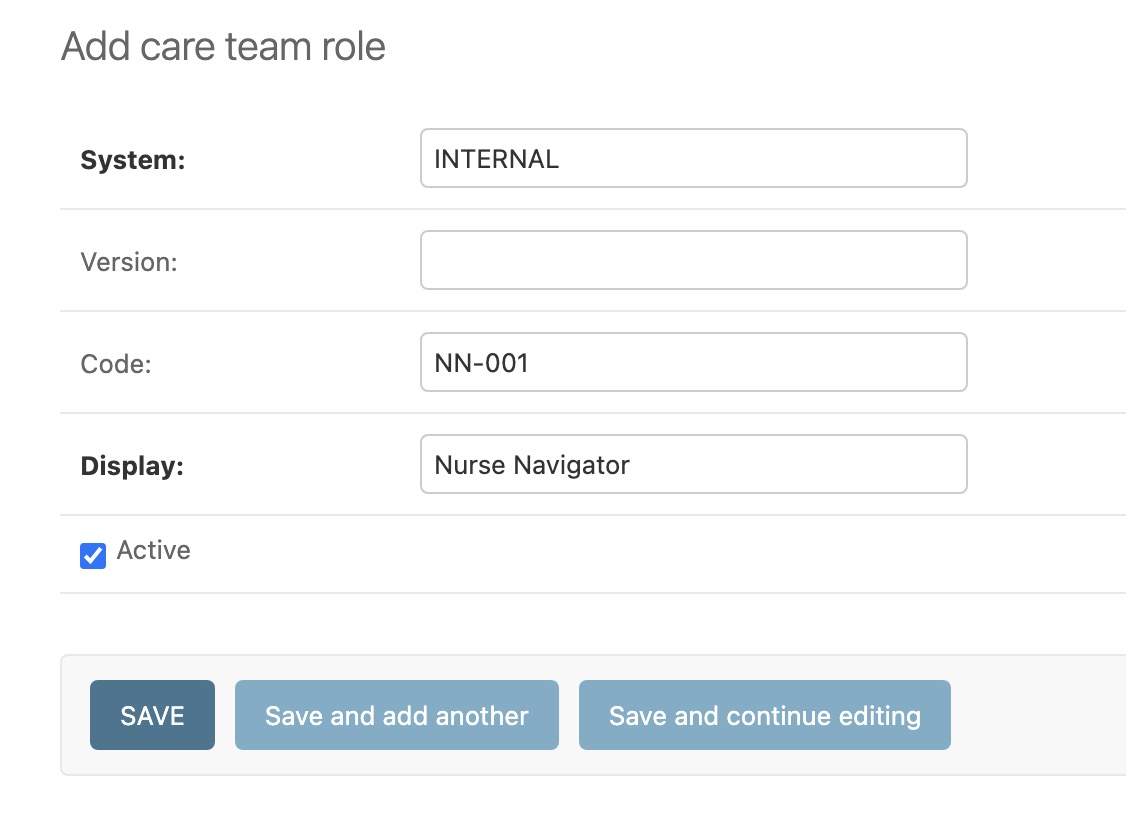
Navigate to Settings > Care team roles
Select ADD CARE TEAM ROLE +
Fill in the required fields:
System (required)
Display (required)
Code (optional)
Select the active checkbox
Select SAVE
External Care Team Setup
Provider Directory Integration:
External care team members are sourced from the Canvas Medical Science directory. This integration:
Prevents duplicate provider entries
Maintains up-to-date contact information
Links providers by name and address matching
Updates provider information when changes are made in the science directory
Each organization is allowed up to two dedicated resources to manage referral contacts. For detailed guidance, please review 📄 Managing Referral Contacts.
FAQ & Troubleshooting
Q: How do external care team members get updated if their information changes?
A: External providers are linked to the Canvas Medical Science directory. When information is updated in the directory, it will be reflected the next time that provider is added to any care team, and existing instances will be updated automatically.
Q: What roles are available for care team members?
A: Available roles are configured by your practice administrator. Common roles include physician, nurse practitioner, physician assistant, health coach, and care coordinator.
Q: How do I know who the care team lead is?
A: The care team lead is indicated by a blue checkmark next to "Team Lead" in the patient's care team section.
Q: Can a staff member be on multiple patients' care teams?
A: Yes, both internal and external providers can be assigned to multiple patients' care teams in various roles as needed.
Q: Why don't I see an external provider I'm looking for?
A: External providers must exist in the Canvas Medical Science directory. If a provider isn't available, check if they're listed under a different name or contact your organizations dedicated resource or Canvas Support to have them added to the directory.
Related Resources
Keywords: care teams, care team lead, team members, patient care coordination, messaging routing, team roles, healthcare team management, external providers, internal staff, outside providers, provider directory
Categories: Patient Management, Care Coordination, Team Management, External Integration