Filter Notes in Patient Timeline
Last updated: May 23, 2025
The timeline is a core component of the patient chart in Canvas Medical, displaying and storing all notes. This guide explains how to effectively utilize filters in the timeline to refine the view based on note type, author, and date range.
User’s Guide
Filtering the Patient Timeline
The timeline provides an overview of various note types for a patient. By using the filter button in the patient chart heading, users can streamline visible entries to quickly locate pertinent information.

Available Filter Options
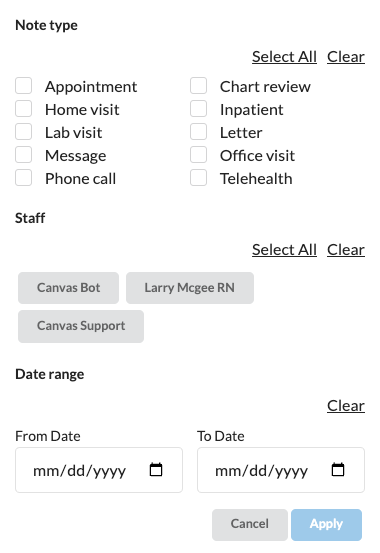
The timeline can be filtered using the following criteria:
Note Type: Choose one or more note types to refine the results.
Author: Filter by selecting one or more authors.
Date Range: Limit the display to notes created within a specific period.
After applying the filters, only the notes meeting all selected criteria will be displayed in the timeline.
Click APPLY to ensure the filter actively updates the timeline.
Sticky filter
When a filter is applied to the patient timeline view, the setting will be carried over when navigating within the same patient chart, e.g. between Chart and Profile, between different patient charts, and across different sessions like logging in and out.
The sticky filter only applies to the note type and staff setting. Date range will not persist and will reset when navigating to different patient charts or login sessions.
Use "Clear" in the filters and then "Apply" to reset any filters.
Configuration & Set Up
There is no specific configuration to enable note filters. Note filters must be selected for each user in each chart.
FAQ & Troubleshooting
Q: Why aren’t my filters working?
A: Ensure Apply was clicked after selecting filters. Also, confirm that the filters you’ve selected would logically return results (e.g., dates within a valid range).
Related Resources
Keywords & Metadata
Keywords: timeline, patient chart, filters, note type, date range, Canvas support, office visits
Categories: Charting, User Interface, Patient Timeline