Contact Categories
Last updated: June 14, 2025
Introduction
Contact Categories provide the ability to create custom contact tags for patient profiles. These tags help organize and categorize patient contacts, making it easier to identify different types of relationships such as emergency contacts, family members, or authorized individuals for various purposes.
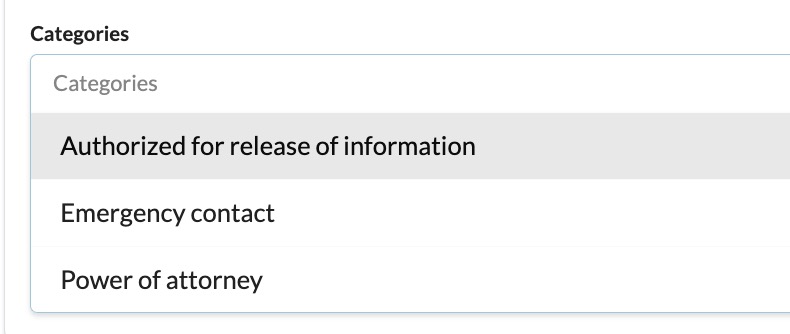
Canvas includes three default contact categories
Power of Attorney
Emergency Contact
Authorized for Release of Information
User's Guide
Contact Categories appear as dropdown options in the contact section of patient profiles, allowing you to classify each contact according to their relationship or role.
Using Contact Categories
When adding or editing a contact in a patient's profile:
Navigate to the contact section of the patient profile
Select the appropriate category from the dropdown menu in the categories field
Configuration & Set Up
Adding Contact Categories
Navigate to Practice: Contact Categories
Click
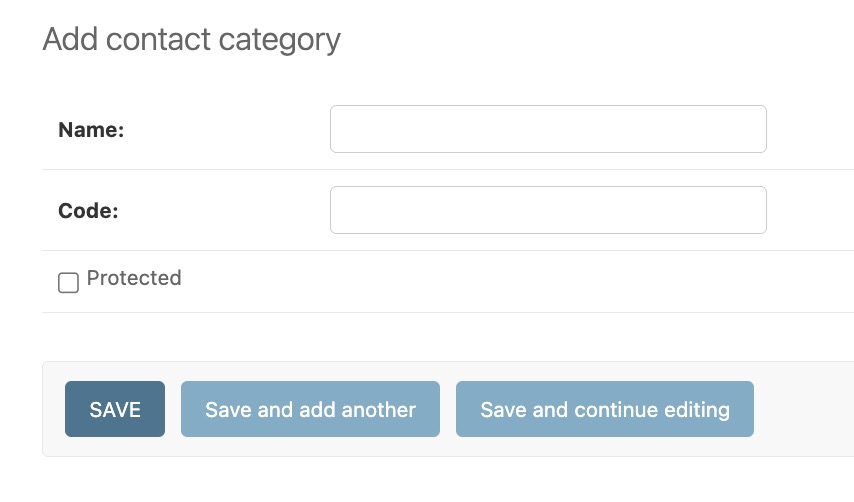
ADD CONTACT CATEGORY +in the top right cornerComplete the following form:
Name: This will be the displayed form in the dropdown of the categories field in the contact section of the patient profile
Code: This should be a unique code developers use to represent the contact category value
Protected: When enabled, this contact category cannot be deleted
Updating & Deleting Contact Categories
To edit a contact category:
Click into an existing contact category
Make the changes needed
Save your updates
To delete a contact category:
In the list of contact categories, use the checkbox to mark any categories that need to be removed
Select the Delete selected contact categories action
Click Go
FAQ & Troubleshooting
Q: Why can't I delete certain contact categories?
A: Power of Attorney, Emergency Contact, and Authorized for Release of Information are default contact categories that are protected and cannot be removed. Additionally, any custom contact categories that have been marked as protected also cannot be deleted.
Q: What happens if I delete a contact category that's already in use?
A: If a contact category is deleted, the user is presented with all of the patient contact points that will be removed along with it.
Related Resources
Keywords: contact categories, patient contacts, practice settings, contact tags, emergency contacts, power of attorney
Categories: Practice Management, Patient Information, Configuration