When code changes outside Studio
Last updated: October 24, 2026
If someone updates your plugin's code outside Studio, either in your team's code repository or directly through Canvas Platform, Studio detects and imports those changes. This helps prevent future updates from accidentally overwriting work completed outside Studio.
If you use Gated release
If your organization uses Gated Release, Studio checks your connected repository:
When someone opens the project.
Before you select Promote Updates.
If Studio detects changes, it imports them into your project and notifies you in the chat. When changes made in the repository conflict with Studio's existing work:
Studio pauses Promote Updates.
The chat identifies the files with conflicts.
Ask the assistant to merge the changes.
Once the conflicts are resolved, you can continue with promotion.
If your plugin’s code is on Canvas Platform
When someone sends a change to the plugin on Canvas Platform, Studio brings it in the next time the project opens, and the chat says it picked up changes made outside Studio.

What Happens to Your Next Deployment?
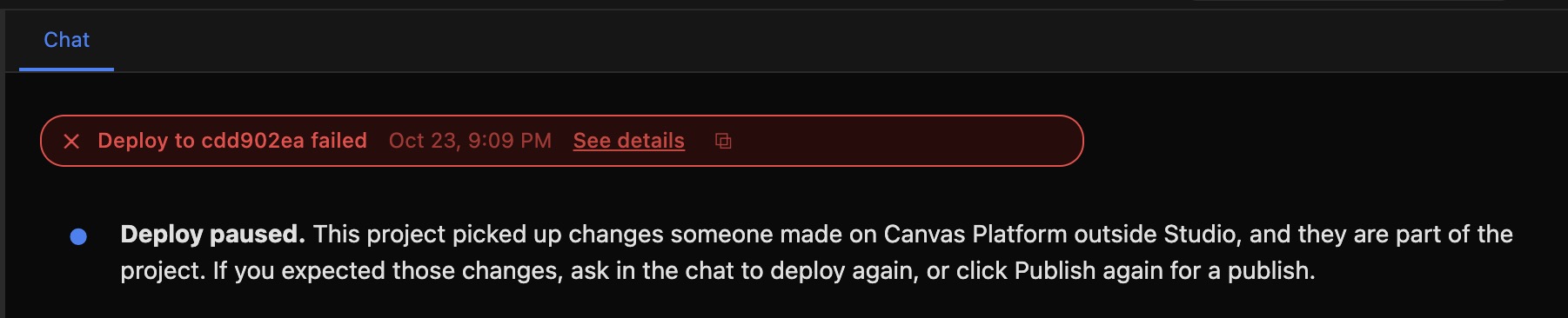
To prevent changes from being deployed without your review, Studio pauses your next deployment.
You'll see:
Deployment status: Failed
Chat message: Deploy paused
To continue: Review the changes, then ask Studio to deploy again when you're ready.